
New Release Available: Release 2026.1.1

Hello from the Cerberus team!
We're pleased to announce our latest release: 2026.1.1. This latest release incorporates a number of critical fixes.
For customers on Cerberus version 2026.1.0: Please note that the in-app upgrade from 2026.1.0 will display an “Invalid command line” installation error, as the installer will have been downloaded automatically during the in-app upgrade attempt to C:\ProgramData\Cerberus LLC\Cerberus FTP Server\installers\CerberusUpdate_amd64_2026.1.1.0.exe.
Please run this file manually to complete the upgrade. Future in-app upgrades from 2026.1.1 onward will work as intended.
- Fixes
- Addressed an installer issue by bundling an updated VC++ redistributable, resolving the “Service failed to start” error encountered in some installs of version 2026.1.0.
- Duo Multi-Factor Authentication no longer fails with “Session Expired” or “Access Denied” errors on Duo’s Universal Prompt architecture.
- Addressed an in-app update issue in version 2026.1.0 that passed an incorrect version parameter to the installer which led to upgrade failure. This has been resolved in version 2026.1.1.
-

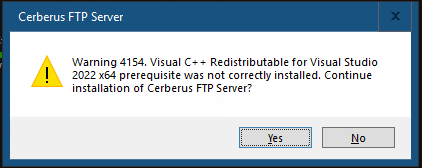
I ran into an error where the VC++ prerequisite check failed. Manually installing the latest VC++ redistributable and then running the 2026.1.1 update solved it as a workaround.
0 -

I too had the C++ issue. I downloaded and manually installed the latest 64bit offering from Microsoft (https://aka.ms/vc14/vc_redist.x64.exe). After that I re-ran the Cerberus update and it installed without issue.
 0
0
Please sign in to leave a comment.
Comments
2 comments