
User 2FA setup issue causing “unable to access custom settings” message on Load balanced Cerberus Servers.

Cerberus Support,
- We run 2 Cerberus servers in a load balanced array with a 15 minute Bi-directional Auto Sync of all Cerberus Objects.
- We have been on-boarding a number of new accounts in the past 2 weeks and have identified an issue that I am unable to explain. I am the Cerberus SME for the organization and I have instructed them to use the Latest Support Article for 2FA setup (https://support.cerberusftp.com/hc/en-us/articles/115000830764-Setting-up-two-factor-authentication), and to include manual server syncs, after password changes, after 2FA linkage verification and after customer sets Password Reset Security Questions, to ensure the newly setup accounts are setup correctly on both servers. I have also included log filters and procedures for the setup teams watching customer setup events in Logging Blade of Admin HTTPS interface.
- Success Message.
“Two factor authentication is now enabled for user account“
- Or Failures, if 6 digit code didn’t bind properly to mobile QR code.
“Unable to authenticate provided 2FA method”
- Next you should see the user setup Password Reset Questions and Save.
“GET /file?m=Your%20security%20questions%20have%20been%20set&s=1 HTTP/1.1”
- Then, manually Perform a Sync from the server with the logged traffic Sync Manager Blade to the other server to maintain account parity. The Security Questions save is what we cannot programmatically sync yet, at this time.
Please Help Me answer this issue the setup teams are experiencing:
"I’ve done two 2FA setups now and its taking close to 45 minutes of log in, log out, try this, try that to attempt to get the customers setup. Cerberus is asking them for 2FA when logging in. For some reason, when they try to enable to 2FA, the following 2 boxes get checked in their accounts.
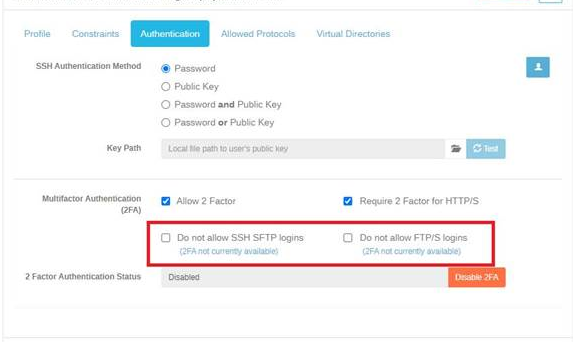
I’m not sure what’s causing these boxes to get automatically turned on. If I uncheck them and they fail to setup 2FA … they become checked again. The user then gets an error message “unable to access custom settings". Unchecking the boxes and having them logout and back in causes 2FA to say it was not setup properly. We followed the Cerberus support article to the letter and they received the “unable to access custom settings” message. We tried another 2FA app outside of Google and it failed all together (as expected).
I was able to get one user to setup 2FA successfully, the site said it was configured correctly and they were able to bypass 2FA and enter their security questions. Upon trying to save their security questions the screen reverted back to 2FA and said it was not setup."
Thank you so much for your help.
Pgrant
Please sign in to leave a comment.
Comments
0 comments